
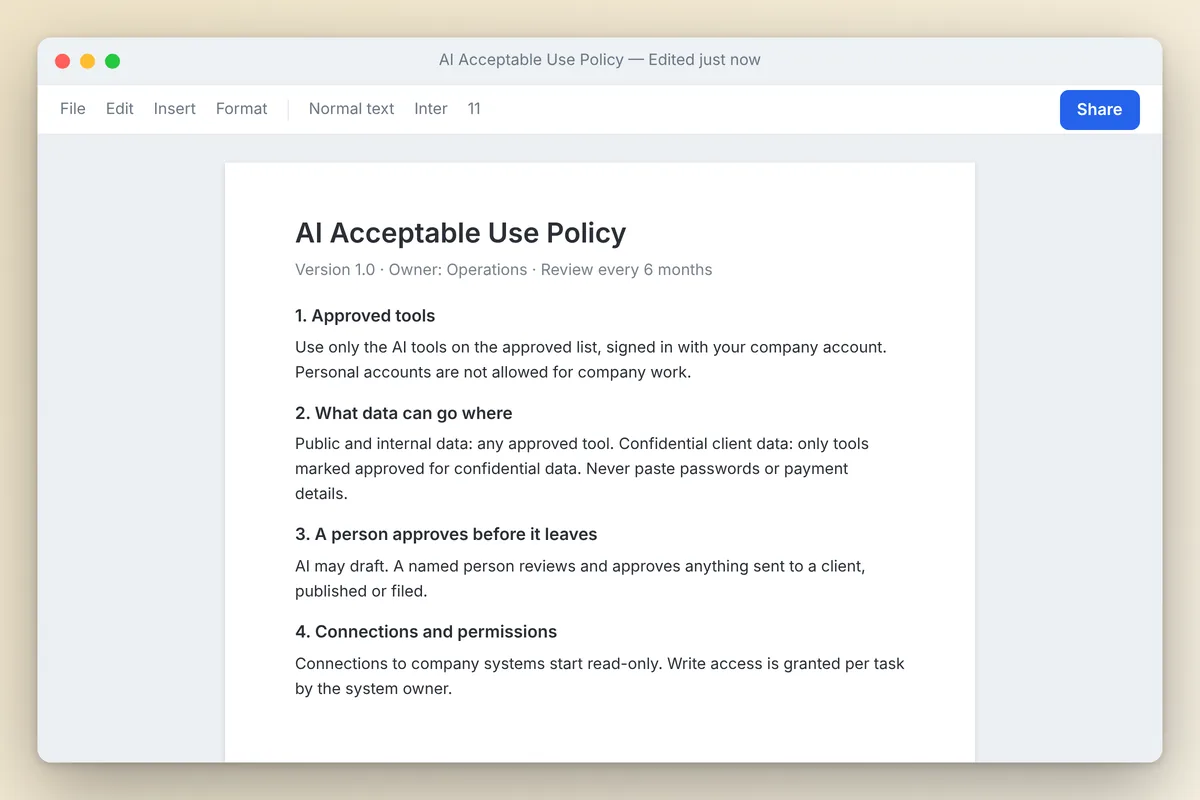
An AI acceptable use policy is a short set of rules that tells employees which AI tools they may use, on which accounts, with what data, and who must review the output before it leaves the company. For most mid-market firms, one page covering approved tools, data limits, human review, system access and accountability does the job.
Your staff are already using AI, policy or not. Below are the sections that matter, a template to copy and a rollout plan. It comes from how we run Shiptronix, where AI is connected to email, file storage, spreadsheets, accounting, e-commerce and ad platforms every day.
Why does a short AI policy work better than a long one?
Because people actually remember one page. Long AI policies get skimmed once, and they are often so cautious that staff route around them with personal accounts. The work still happens, just with no visibility and no business data terms.
The test: a salesperson can answer "can I paste this into the AI tool?" without looking anything up.
Our take: keep the changing details (approved tools list, setup steps, examples) on a separate reference page. The policy changes rarely. The tool list changes often.
What should an AI acceptable use policy include?
Seven sections, a few lines each, not a few pages.
1. Approved tools and accounts
Name the tools and the account type. "ChatGPT" is not a useful approval. "ChatGPT on the company Business workspace, signed in with your work email" is.
The account type matters because consumer and business plans are governed by different terms. OpenAI states that for ChatGPT Business, Enterprise, Edu and its API, "by default, we don't use provided inputs and outputs to train our models" (OpenAI Help Center). Anthropic's consumer terms for Claude Free, Pro and Max let users choose whether chats are used for model training, and Anthropic says those terms do not apply to services under its commercial terms, including its Team and Enterprise plans and the API (Anthropic). Vendor terms change, so check each vendor's current page before you approve a tool, and recheck when you renew.
If you only do one thing: company work goes into company accounts. Personal AI accounts are not approved for company data, even if the employee pays for a premium tier.
2. Data rules: what can go into which tools
This is the heart of the policy. Take the three or four data tiers you already have (or write them in an afternoon) and map each one to the tools approved for it.
| Data tier | Examples | Where it may go |
|---|---|---|
| Public | Published website copy, press releases, public filings | Any approved tool |
| Internal | Process documents, meeting notes without client details, internal drafts | Approved business accounts only |
| Confidential | Client files, contracts, financials, employee records, pricing | Only tools specifically approved for confidential data, and only for the stated purpose |
| Restricted | Passwords, API keys, payment card numbers, health records, data your contracts forbid sharing | Never into AI tools |
Spell out two things:
- Client contracts can restrict where client data is processed, so it stays out of any tool not cleared for it.
- Credentials never go into a prompt or a document an AI will read.
3. Human review before anything goes out
AI may draft. A person approves before anything is sent to a client, published, filed or used to make a decision about a customer or employee. The reviewer is accountable for the content as if they wrote it.
This is the rule we hold hardest in our own shop. AI drafts replies, reports and documents. A person approves every client-facing send. It costs seconds and catches the occasional confident error.
4. Connecting AI to company systems
This is the section most policies miss. Older ones stop at "do not paste sensitive data into chatbots." Assistants now connect directly to email, file storage, accounting and other systems through connectors and protocols such as MCP, which we explain in what MCP servers are. Once connected, the AI can read, and sometimes act, without anyone pasting anything.
Say who may connect an AI tool to a company system, and on what terms. The rules we run internally:
- Connections are read-only by default. Write access (sending, editing, deleting, posting) is granted for a specific task, not permanently.
- Each business account stays separate. One entity's mailbox or ad account is never mixed with another's in the same connection.
- Connections are set up by an approved owner, not by individual employees signing in with their own credentials on a whim.
- Anything that sends email, moves money or changes live settings still requires a person to approve the action.
5. Disclosure
Disclose AI involvement when a client contract or regulator requires it, and wherever company standards say so. Our take: tie it to real obligations rather than labeling every email.
6. Accountability and ownership
Name an owner (often the COO, CFO or head of IT). Each employee is responsible for what they send, whatever tool drafted it.
Say how to report a mistake, such as confidential data entered into the wrong tool, and make honest reporting safe.
7. How to request a new tool
Without an easy path to approval, people use unapproved tools. Spell out:
- Who to ask
- What to include: tool, account type, data involved, business reason
- A target turnaround
Repeat work becomes a documented procedure
When a task gets done with AI more than a few times, we turn it into a documented, reviewed procedure (a skill) instead of a fresh prompt each time. The data sources, steps and approval points get checked once instead of improvised. This belongs on the reference page, not in the policy.
Is there a simple AI usage policy template?
Yes. Copy this, replace the bracketed items, and keep it to one page.
[COMPANY] AI ACCEPTABLE USE POLICY
Owner: [NAME, TITLE]    Effective: [DATE]    Review: every 6 months

1. Purpose
We use AI tools to work faster and better. This policy keeps company,
client and employee data safe while we do.

2. Approved tools and accounts
Use only the tools on the Approved AI Tools list [LINK], and only
through company accounts signed in with your work email. Personal AI
accounts may not be used for company work or company data.

3. Data rules
- Public data: any approved tool.
- Internal data: approved business accounts only.
- Confidential data (client files, contracts, financials, employee
  records, pricing): only tools approved for confidential data, for
  the approved purpose.
- Restricted data (passwords, keys, payment card data, health records,
  anything a contract forbids sharing): never.
If you are unsure which tier applies, treat it as the higher tier.

4. Human review
AI may draft. A person must review and approve anything before it is
sent to a client, published, filed, or used to decide something about
a customer or employee. You are responsible for what you send.

5. Connecting AI to company systems
Only [OWNER/IT] may connect AI tools to company email, files,
accounting or other systems. Connections are read-only by default.
Write access is granted per task. Keep each business account separate.

6. Disclosure
Disclose AI involvement when a client, contract or regulator requires
it, or when [COMPANY STANDARD].

7. Reporting
If data goes into the wrong tool or AI output causes a problem, tell
[CONTACT] right away. Prompt, honest reporting will not be punished.

8. New tools
Request new tools from [CONTACT] with: tool name, account type, data
involved, business reason. Target answer: [5] business days.

9. Violations
Breaking this policy may lead to loss of tool access and other
disciplinary action under [HANDBOOK SECTION].
Next step: have your employment or privacy counsel review the final version, especially disclosure, violations and anything touching regulated data in your industry. This is practical guidance, not legal advice.
How should you roll out an AI acceptable use policy?
Make following the rules the easy path. The order we use:
- Ask before you write. Survey staff on the AI tools they already use, and make clear the goal is to approve good tools, not to punish.
- Set up business accounts first. Publish the policy the same day the approved company accounts are ready.
- Walk through it in 20 minutes. Cover the data table and the human review rule with real examples from your own business.
- Collect acknowledgments. A simple signed or checked acknowledgment is enough.
- Review every six months. Update the approved tools list whenever needed.
How does this relate to the NIST AI Risk Management Framework?
The NIST AI Risk Management Framework (AI RMF 1.0, released January 26, 2023) is a voluntary framework organized around four functions: Govern, Map, Measure and Manage. In July 2024 NIST added a Generative AI Profile (NIST AI 600-1) that applies the framework to generative tools. An acceptable use policy is one piece of the Govern function: roles, rules and accountability for how people use AI.
Our read: you do not need the full framework to write a good policy, but it is a solid reference when customer security questionnaires come in.
If you want help, our AI strategy consulting work includes drafting and rolling out these policies with executive teams, alongside the readiness work in our AI readiness assessment guide.
Frequently asked questions
Do small and mid-sized companies really need an AI acceptable use policy?
Yes, once employees handle client or financial data. Without one, staff decide what is safe on their own, usually on personal accounts. One page turns hidden AI use into approved, visible use.
Can employees use their personal ChatGPT or Claude accounts for work?
Most policies should say no for company data. Business plans carry different data terms than consumer plans, including on model training. Provide company accounts so nobody needs a personal one.
What is unacceptable use of AI at work?
Entering passwords, card data or confidential client material into unapproved tools; sending AI output to clients unreviewed; letting AI make final hiring or disciplinary decisions; and connecting AI to company systems without approval.
Should an AI policy cover AI tools connected to email and company files?
Yes. Connected assistants can read and act inside systems without anyone pasting data, so the policy should say who may set up connections, that access is read-only by default, and that sending or changing anything still needs a person's approval.