
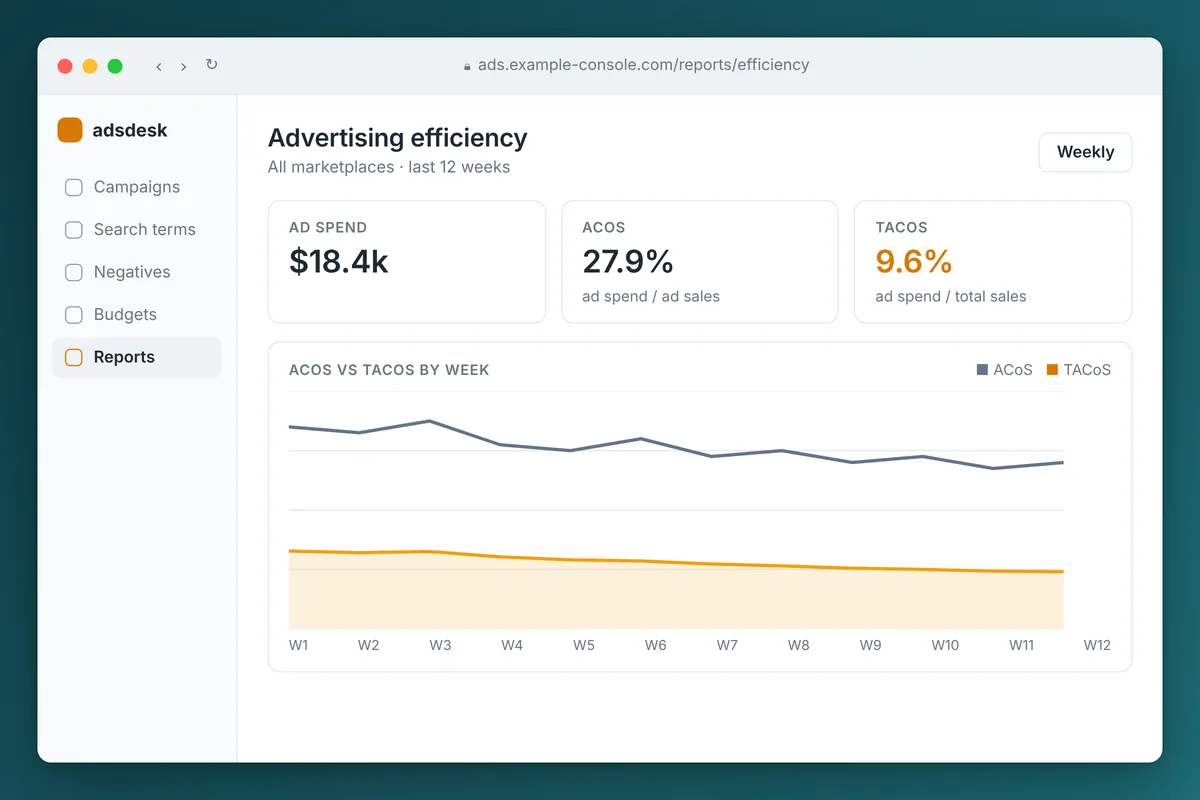
TACoS on Amazon (total advertising cost of sale) is total ad spend divided by total sales, ad plus organic, times 100. ACoS divides the same spend by ad sales only.
ACoS tells you if your ads are efficient. TACoS tells you if the business is getting hooked on them, or if ads are building organic sales.
We run our own brands on Amazon and Shopify and look at both every week. Our take: manage campaigns to ACoS, judge the program on TACoS.
Below are the exact formulas, how to read the two together, how to set a target from your own margin instead of a benchmark, and the levers that actually move it.
What are the formulas for ACoS, TACoS and ROAS?
Amazon defines ACoS (advertising cost of sales) in its own ACOS guide as ad spend divided by ad revenue, times 100. ROAS is the inverse.
TACoS is not a standard metric in Amazon's campaign reports. You calculate it yourself using total sales from Seller Central business reports.
| Metric | Formula | What it answers |
|---|---|---|
| ACoS | Ad spend / ad-attributed sales x 100 | How much did each dollar of ad sales cost? |
| ROAS | Ad-attributed sales / ad spend | How many dollars of ad sales per dollar spent? |
| TACoS | Ad spend / total sales (ad + organic) x 100 | What share of all revenue goes back into ads? |
A worked example with illustrative numbers for one month:
- Ad spend: $8,000
- Ad-attributed sales: $32,000
- Total sales for the same products and period: $100,000
That gives an ACoS of 25%, a ROAS of 4.0 and a TACoS of 8%. The ads look moderately expensive on their own, but advertising consumes only 8 cents of every revenue dollar.
Keep the scope matched. Ad spend and total sales must cover the same products, marketplace and date range, or the TACoS figure means nothing.
What is the difference between ACoS and TACoS?
ACoS only sees sales that Amazon attributes to an ad click. It misses the organic sales that come later, partly because advertising pushed sales velocity and improved organic rank.
TACoS puts spend over everything. It captures that halo, and it also exposes ads that are simply capturing sales you would have made anyway.
Attribution adds another wrinkle. Amazon credits ad sales within a window after the click, and the window differs by ad type and by whether you are a seller or a vendor (third-party reporting tools commonly list 7 days for Sponsored Products bought by sellers and 14 days for Sponsored Brands and Sponsored Display).
Sales keep landing in the report for days after a click, so the last week of ACoS is always incomplete. That is one reason we judge any change over several weeks, never over five days.
How do you read TACoS and ACoS together?
Watch the direction of both metrics over the same period. There are four combinations:
| ACoS | TACoS | What it usually means | What to do |
|---|---|---|---|
| Falling | Falling | Ads are getting more efficient and organic sales are growing | Healthy. Consider scaling budget on what works |
| Rising | Falling | Ads cost more per ad sale, but total sales grow faster than spend | Often a ranking push that is working. Hold, watch organic rank |
| Falling | Rising | Ads look efficient, but organic sales are shrinking or ads are taking credit for sales you already had | Check organic rank, branded and already-ranked terms, stock and listing health |
| Rising | Rising | Paying more for less across the board | Fix first: wasted search terms, rising CPCs, falling conversion |
The third row is the one ACoS alone hides. An account can report a beautiful ACoS while total sales slide, because the ads are concentrated on shoppers who would have bought anyway.
When we see it, the first place we look is spend on search terms where the product already ranks near the top organically.
What is a good TACoS on Amazon?
There is no universal good TACoS. Published benchmarks often quote ranges like 5% to 15% for established brands, but those are rules of thumb, not data about your product.
Our take: a good TACoS is the highest number your margin can support while still hitting your profit goal, adjusted for where the product is in its life.
How do you calculate break-even ACoS from your margin?
Amazon's guide ties break-even ACoS directly to profit margin: if ACoS is above your margin before ad costs, each ad sale loses money. Calculate it per unit.
These numbers are an example only. Use your own costs and check Amazon's current fee pages, since referral and fulfillment fees vary by category and change.
| Item (example) | Per unit |
|---|---|
| Selling price | $30.00 |
| Product cost, landed | $7.50 |
| Referral fee (example 15%) | $4.50 |
| FBA fulfillment fee (example) | $5.50 |
| Returns, storage and other (example) | $1.50 |
| Profit before advertising | $11.00 |
Break-even ACoS = $11.00 / $30.00 = 36.7%. An ad sale at an ACoS above 36.7% loses money on that order.
How do you turn margin into a target TACoS?
Because TACoS uses total sales, it maps directly to profit: target TACoS equals margin before advertising minus desired profit margin.
In the example, a 15% profit target gives a target TACoS of about 21.7% (36.7% minus 15%). A 25% profit target drops it to about 11.7%. A high-margin product can carry a TACoS that would sink a thin-margin one.
How does product life stage change the target?
- Launch: you are buying sales velocity and reviews, so TACoS runs well above target for a planned period. Set a time limit and a spend ceiling in advance.
- Growth: TACoS should trend down as organic rank builds, even if ACoS stays elevated.
- Mature: a stable or falling TACoS at steady or rising total sales, with spend focused on defending position and finding incremental terms.
What moves TACoS?
TACoS has two halves: spend on top and total sales underneath. You lower it by cutting waste or by growing organic sales. The levers we use most:
Negative keywords and wasted search terms
The search term report shows the actual queries that triggered your ads. Terms that keep spending with no sales over a meaningful click count should be added as negatives.
Sponsored Products supports negative exact and negative phrase matching, which lets you block a specific query or any query containing a phrase. This is the single most common finding in our audits.
Budget caps
A campaign that runs out of budget early in the day stops showing for the rest of it. If it is profitable, move budget from weak campaigns to it. If it is unprofitable, the cap is hiding a bid problem.
Spend on terms you already rank for
Paying for clicks on queries where you already rank in the top organic positions can be right (defending against competitors on your own brand terms) or pure waste.
Test it: reduce bids on a few such terms for several weeks and see whether total sales for those products hold.
Campaign structure
Separate discovery campaigns (auto and broad) from performance campaigns (exact match on proven terms). That keeps budget from leaking to experiments and makes the reports readable.
Harvest proven terms from discovery into exact match, then negate them in the discovery campaign so they do not compete.
Organic rank and listing quality
Anything that lifts organic conversion lowers TACoS without touching ads:
- Better main image.
- Clearer title and bullets.
- More and better reviews.
- Competitive price.
- Staying in stock.
Running out of stock kills organic rank and sends TACoS up for weeks after inventory returns.
How we audit Amazon ad accounts
We audit accounts across Sponsored Products, Sponsored Brands and Sponsored Display with a repeatable process, packaged as a reusable AI workflow (we describe the approach in our article on Claude skills for business).
The output is a prioritized list of fixes, each with the campaign name, the spend involved and the exact change to make, plus a multi-tab spreadsheet of the underlying data.
Three findings show up in almost every account we review:
- Search terms that have spent money with no sales and should be negated.
- Campaigns that hit their budget cap early in the day, often the profitable ones.
- Spend concentrated on terms the product already ranks for organically, which flatters ACoS while doing little for TACoS.
If you only do one thing: chase down the first one. Negating dead search terms cuts spend without touching what already sells.
We track TACoS weekly alongside total and organic sales on a single dashboard (see AI dashboards for how we build those), and judge changes over weeks rather than days.
Our Amazon advertising management service covers the audit and the ongoing work.
Frequently asked questions
Where do I find TACoS in Amazon Seller Central?
Amazon's campaign reports center on ACoS and ROAS, so you calculate TACoS yourself. Take total ad spend from the advertising console for a date range, take total ordered product sales for the same products and range from the business reports in Seller Central, divide spend by sales and multiply by 100.
Is a lower TACoS always better?
No. A very low TACoS can mean you are underinvesting and leaving rank to competitors. A falling TACoS with falling total sales is not a win.
Should I optimize for ACoS or TACoS?
Use both. Optimize individual campaigns and keywords on ACoS against your break-even, because that is where bids and negatives live. Judge the overall advertising program on TACoS and total sales, because that shows whether ads are building the business or just buying the same sales.
How long should I wait before judging a change to my Amazon ads?
Several weeks, not days. Ad sales keep being attributed for up to two weeks after a click, conversion rates vary by day of week, and organic rank responds slowly. We compare at least two to four weeks before and after a change, and longer for organic effects.
Why did my TACoS go up when my ACoS went down?
Usually total sales fell while ad sales held. Common causes are lost organic rank, a stockout, a lost Buy Box, a price change, or ads shifting toward shoppers who would have bought anyway. Check organic sales by product before changing bids.