
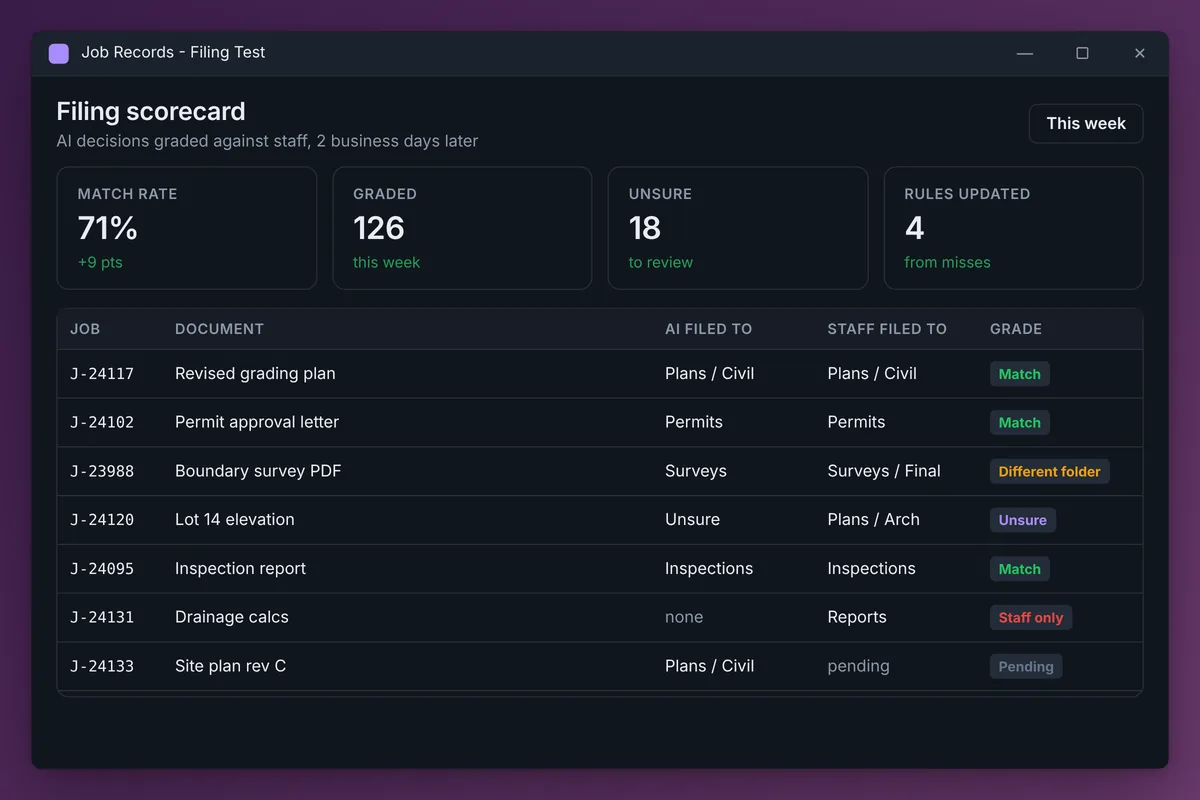
Human-in-the-loop AI is AI that works alongside people and uses their decisions to get better. The version we build runs in shadow mode beside your staff, logs every call it makes, checks it against what the person actually did, and turns each miss into a written rule. It goes live only after its scorecard proves it.
Most "AI automation" skips the loop. Someone writes a prompt, connects a tool and hopes. When it is wrong, nobody finds out until a client does.
We do it the other way around. Your staff already know the right answer for every email, invoice or ticket. The job is to measure what they do and feed it back until the AI does the same.
This is how we set it up for an engineering and surveying firm that wanted AI to file project email, and the same pattern works for most repeat decisions in a business.
What does human-in-the-loop AI actually mean?
There are two versions, and they are not the same thing:
| Approval gate | Learning loop | |
|---|---|---|
| What the person does | Approves or rejects each AI action | Keeps doing their job as usual |
| What the AI does with it | Waits for the click | Compares its call with theirs and learns from the difference |
| Does it get better on its own? | No | Yes, every cycle |
| Cost in staff time | A click on every item | Close to zero during the test |
Approval gates are fine for high-stakes actions like sending money. But they do not teach the AI anything, and people start clicking approve without reading.
The learning loop is what people mean when they talk about self-improving or recursive AI in a business. The system's own results become the input to its next run.
Does the AI really learn, or is that marketing?
It learns, but not by retraining a model. Nobody is fine-tuning anything.
What changes is the written playbook the AI follows: its rules, its examples and its list of exceptions. When staff do something different from the AI, the reason becomes a new or corrected rule, so the next run decides with more context than the last one.
Our take: that is the right kind of learning for a business. You can read every rule in plain English, see when it changed and why, and roll it back. A retrained model gives you none of that.
How does the loop work?
Six steps. This is the setup we run for the engineering firm's shared inbox.
1. Learn from history before doing anything
The AI reads a few months of past work and matches each item to what the team did with it. For the engineering firm that was about 300 inbound emails and where staff filed each attachment.
From that it writes the firm's filing rules in plain language. For most businesses this is the first time the process has ever been written down.
2. Run in shadow mode
The AI does the work for real, but somewhere harmless. It files copies into a test folder that mirrors the real library. The real library is never touched, and the staff keep working exactly as they always have.
3. Log every decision next to the job
Each decision gets one line on the job's record: the date, the item, what the AI did and "Staff: Pending." For this client the records live in Airtable, where we moved their full job list of 8,455 jobs so the AI and the staff work from the same list.
4. Grade on a delay
Two business days later, the AI checks what the staff actually did with the same item, and grades itself on that same line:
- Match
- Different folder
- Renamed
- AI only (it filed something staff skipped)
- Staff only (it missed something staff filed)
The delay matters. Grade too early and you are scoring against work the staff have not finished yet.
5. Turn every miss into a rule
A "Different folder" result is not just a bad score. It is a lesson. The AI works out why the staff chose differently and updates its rules. Over a few weeks the misses shrink to genuine edge cases.
6. Report in a few lines
Each morning a short summary goes out: match rate by category, what changed in the rules, and a short list of items the AI was unsure about for a person to look at.
Why should the AI be allowed to say "unsure"?
Because a confident wrong answer is the most expensive outcome, and "unsure" is the cheapest way to find what is missing.
In its first two days, the engineering firm's loop logged decisions on 44 jobs. It filed 14 and flagged 30 as unsure. Almost all of the unsure items came from one large builder whose drawings lived in a library the AI could not see yet.
That was a permissions gap, found on day one, without a single file landing in the wrong place.
When does it go live?
When the scorecard says so, not when the calendar does.
- Agree the bar before you start: the match rate you need, and for how many weeks in a row.
- Go live one category at a time. The routine categories usually earn it first.
- Keep "unsure" routing to a person even after go-live.
- Keep grading after go-live. The loop does not stop just because the test did.
If you only do one thing on this list, build the scorecard before the automation. Without it, you are trusting a guess. With it, you are training an employee you can measure.
Where else does this pattern work?
Anywhere a person makes the same kind of decision many times a week, and the result of that decision is recorded somewhere:
| Process | What the AI decides | What it grades against |
|---|---|---|
| Shared inbox filing | Which job and folder | Where staff filed it |
| Invoice coding | GL account and class | The bookkeeper's final coding |
| Lead routing | Which rep or pipeline | Where the lead ended up |
| Support tickets | Category and priority | The agent's final category |
| SEO content | What to write or refresh next | Rankings, clicks and leads a few weeks later |
The last row works on a slower clock, and the "humans" are your search results. We run that version for a public adjusting firm and for this website. We use the same idea in a daily e-commerce review that reads every channel before anyone else does.
What can go wrong?
- Your staff are not always right. Sometimes the AI is correct and the person filed it wrong. Flag conflicts for review instead of blindly copying the human.
- Rules pile up and start to contradict each other. Review the rulebook every few weeks and merge what overlaps.
- The AI cannot see everything the staff can. Missing access looks like bad judgment until you check permissions.
- The process changes. A new client, folder structure or form breaks old rules, and the scorecard is how you notice.
Where to start
Pick one repeat decision, find where the outcome is already recorded, and run the AI in shadow mode for two weeks. You will learn more from that scorecard than from any demo.
For the email version of this in detail, read AI email management for a shared inbox. For other ways to capture how your team works, see training AI on your processes. We build these loops as part of our AI workflow automation work, and the full write-up of the engineering firm project is in our case study.
Frequently asked questions
Is human-in-the-loop AI slower than full automation?
During the test, yes, because nothing goes live until the scorecard proves it. After that it runs at full speed on the categories it has earned, and only unsure items wait for a person.
Does the AI retrain on my company's data?
Not in our setup. The model stays the same. What changes is the written rulebook it follows, which you can read, edit and roll back.
How long should AI run in shadow mode?
Until the match rate holds at the level you agreed for a few weeks in a row. For a busy shared inbox that can be a few weeks. For low-volume processes it takes longer, because you need enough decisions to grade.
What if my staff make mistakes the AI learns from?
Set the loop up to flag conflicts instead of copying them. When the AI's choice fits the written rules and the person's does not, a person should decide which one is right before any rule changes.
Can this work with tools we already use?
Usually. The AI needs to read the inputs, such as an inbox, a folder or a queue, and see where the outcome is recorded, such as a CRM, accounting system or document library. Most of that is reachable through standard connectors.