
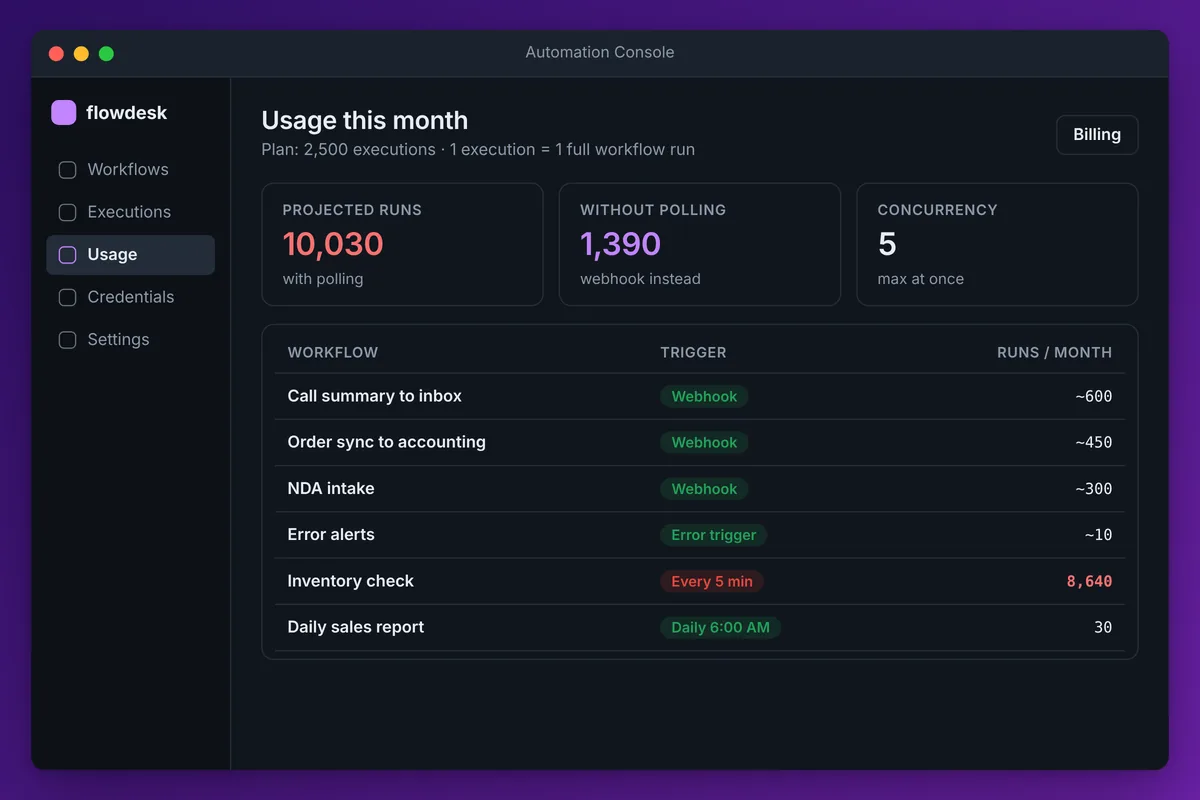
n8n pricing is based on executions, not users or steps. On n8n Cloud, the Starter plan is listed at 20 euros a month billed annually for 2,500 executions, and Pro at 50 euros a month billed annually for 10,000. The self-hosted Community edition is free, and the self-hosted Business plan is listed at 667 euros a month. One execution is one full run of a workflow, however many steps it has.
Those are the list numbers from n8n's pricing page as of November 2026, and they change, so check before you buy. The more useful question is how many executions your workflows will actually use, because that is what decides the plan.
We run n8n Cloud for our own work: about ten workflows covering inbound call summaries from an AI voice agent, an NDA intake flow, a Shopify-to-QuickBooks order sync and an error notification workflow, among others. Here is what we have learned about the bill.
n8n plans compared
| Plan | Listed price (billed annually) | Executions per month | Hosting | Execution log retention |
|---|---|---|---|---|
| Community | Free | No plan limit | Self-hosted | Your setup |
| Starter | 20 euros a month | 2,500 | n8n Cloud | 7 days |
| Pro | 50 euros a month | 10,000 | n8n Cloud | 30 days |
| Business | 667 euros a month | 40,000 | Self-hosted | Per plan |
| Enterprise | Quote | Custom | Cloud or self-hosted | Unlimited |
A few things on that page matter more than the price. Every plan includes unlimited users, unlimited workflows and every integration. Concurrency is capped (5 concurrent executions on Starter, more on Pro), which matters if a burst of webhooks arrives at once. Monthly billing costs more than annual; third-party write-ups put it at roughly 24 and 60 euros. n8n bills in euros, so the dollar amount moves with the exchange rate.
The jump from Pro to Business is the one to notice. Business adds SSO, Git-based version control and separate environments, and it is self-hosted. Nobody should move to Business for execution volume alone. You move for governance.
How n8n counts executions
An execution is one complete run of a workflow. A two-step workflow and a forty-step workflow that each run once both count as one execution. That is different from Zapier, which bills per task, and Make, which bills for each module that runs.
This is why n8n gets cheaper as workflows get more complex. Our Shopify-to-QuickBooks sync reads the order, maps line items, handles refunds, posts a sales receipt and logs the result. One order, one execution.
It also means the number you need to estimate is runs, not steps. For each workflow, ask how often it fires in a month. Add them up. That is your execution count.
The polling mistake that burns through a plan
The fastest way to blow through a Starter plan is a workflow that checks for something on a short schedule.
A schedule trigger that runs every 5 minutes fires 12 times an hour, 288 times a day and about 8,640 times in a 30-day month. That one workflow is more than three times the Starter allowance, and most of those runs find nothing to do. Every 15 minutes is still about 2,880 a month. Every hour is 720.
We got this wrong early on with a check that looked for new items every few minutes. Here is what we changed. Wherever the source system can push an event, we use a webhook trigger instead, so the workflow runs only when something actually happens. Our call summary workflow is a good example: it fires when the voice agent finishes a call, around two dozen runs on a busy day, and zero on a quiet one. Where we do have to poll, we ask how fresh the data really needs to be. A daily sales report does not need to check every five minutes; once a morning is fine.
If you are estimating cost for a new build, list every trigger and its frequency before you pick a plan. It takes ten minutes and it is the most accurate number you will get.
n8n Cloud vs self-hosted: what self-hosting really costs
Self-hosting the Community edition removes the execution limit, but it does not make n8n free.
You pay for a server, which for a small setup is in the ballpark of a few dollars to a few tens of dollars a month depending on the provider and size. Then you pay in time. Someone has to apply n8n updates, keep the database backed up, watch disk space as execution logs grow, renew certificates and fix it when it falls over at 2 a.m. If that someone bills by the hour, two or three hours a month wipes out the savings against a cloud plan.
Our take: start on n8n Cloud unless you have a specific reason not to. We do. The reasons to self-host are real but narrow:
- Your executions are in the tens of thousands a month and growing, and you already run servers.
- Data has to stay inside your own environment for compliance or contract reasons.
- You need community nodes or system-level packages that are not available on n8n Cloud.
- You need Business-tier features like SSO and Git version control and are buying a self-hosted license anyway.
If none of those apply, the cloud plan is cheaper once you count your own time.
The costs that are not on the pricing page
The n8n bill is often not the biggest line in an automation budget.
AI calls cost money separately. If a workflow calls Claude, OpenAI or another model, those tokens are billed by the AI provider on your own API key, not by n8n. A workflow that summarizes every inbound email can cost more in model usage than in executions. n8n also includes some credits for its own built-in AI assistant and, on cloud plans, a prepaid option for AI services, but most production setups we see run on their own provider keys.
The connected apps cost money too. Twilio charges per minute and per message. A voice agent platform charges per minute of conversation. QuickBooks, Shopify and the rest have their own subscriptions and API limits.
And then there is the build and upkeep. The hours spent designing, testing and fixing workflows are usually the largest cost in the first year. That is also where most of the value is, because a workflow that is built carefully, with an error workflow that alerts someone when it fails, keeps running for years with little attention. We set up an error notification workflow on day one so any failed run sends us a link to the failed execution.
How to choose an n8n plan
Count your executions first, then pick the smallest plan that covers them with room to grow.
If you are under about 2,000 runs a month and mostly use webhook triggers, Starter is enough. If you have several scheduled workflows, need more than a week of execution history for troubleshooting, or expect bursts of webhooks, Pro is the safer choice. If you need SSO, version control and separate environments, that is a Business or Enterprise conversation.
When it is not clear whether n8n is even the right tool for a job, we compare it with an AI agent approach in n8n vs Claude. And if you would rather have someone scope the workflows and the cost before you commit, that is how our AI workflow automation projects start.
Frequently asked questions
Is n8n free?
The self-hosted Community edition is free to use, but you pay for the server and the time to maintain it. n8n Cloud has no permanent free plan; it offers a free trial, then paid plans starting at the Starter tier.
How much does n8n cost per month?
On n8n Cloud, Starter is listed at 20 euros a month billed annually for 2,500 executions, and Pro at 50 euros a month billed annually for 10,000. Monthly billing costs more. The self-hosted Business plan is listed at 667 euros a month. Check n8n's pricing page for current figures.
What counts as an execution in n8n?
One complete run of a workflow, from trigger to finish. The number of steps inside the workflow does not change the count, so a long workflow that runs once is one execution.
Is n8n cheaper than Zapier?
For multi-step workflows it usually is, because n8n charges per workflow run while Zapier charges per task, and each action step in a Zap counts as a task. For a handful of simple two-step automations the difference is smaller, and convenience may matter more than price.
Should I self-host n8n or use n8n Cloud?
Use n8n Cloud unless you need very high execution volume, have to keep data in your own environment, need features only available self-hosted, or already have someone running servers. Self-hosting removes the execution limit but adds maintenance work that often costs more than the plan.