
A Shopify QuickBooks integration works when every order lands in QuickBooks Online once, with product sales, discounts, shipping, sales tax and Shopify fees on separate lines, and the money deposits to a clearing account that the Shopify payout empties. Pick a tool that does that, then add duplicate checks, a review queue and retries.
That is the standard we hold the books to. On November 1 we replaced the paid connector on one of the e-commerce brands we operate with our own workflow, built in n8n, that posts Shopify orders and refunds straight into QuickBooks Online. Two days in, it threw its first real error. Here is how it is built, what broke, and how to decide whether you should use an app or build your own.
What should a Shopify QuickBooks integration actually post?
At minimum, five things, each to its own place:
- Product sales, by item, at the original price
- Discounts, to a discount account, not netted into the price
- Shipping charged to the customer
- Sales tax, split between tax you collected and tax the marketplace is liable for
- Shopify payment fees, so the receipt equals the cash you actually receive
If the integration posts one net number per order, revenue is understated, fees are invisible and tax liability is wrong.
Our take: the order-level detail is worth it for a brand doing a few dozen orders a day. Above a few hundred orders a day, a payout-level summary is easier to live with. More on that below.
What are the main ways to connect Shopify to QuickBooks Online?
| Option | What lands in QuickBooks | Best fit | Watch out for |
|---|---|---|---|
| Intuit's Shopify Connector | Sales receipts per order, fees as expenses, deposits per payout | Simple direct-to-consumer stores | Default mappings, product matching |
| Payout summary apps | One summarized entry per payout | High order volume, many channels | Less order-level detail |
| Per-order sync apps | Sales receipts or invoices per order | Stores that track items and customers in QuickBooks | Fit with your existing chart of accounts |
| Custom workflow (n8n or similar) | Exactly what you design | Unusual tax, multiple stores, a format you must match | You own the maintenance |
Intuit's own connector is a reasonable start. According to Intuit's Shopify integration guide, it imports sales, refunds and payouts, can bring in up to 12 months of history, holds confirmed sales in Undeposited Funds (Payments to deposit) until the payout, and records retail sales as sales receipts and fees as expenses. It also notes that marketplace taxes go to Tax Payable by default and that unmatched products are not added automatically.
Pricing on all of these changes often, so check current plans before you commit.
Why did we build our own instead of using an app?
Three reasons, none of them that the apps are bad.
- The books already had history in a specific format from the previous connector. We wanted new transactions to look identical so reports did not break at a seam.
- Some orders can carry sales tax that the sales channel, not the store, is responsible for remitting. We wanted that on its own line, not mixed into tax we owe.
- We already run n8n for scheduled jobs, so a twice-daily workflow cost almost nothing extra to host.
If none of those apply to you, use an app. A custom integration is a small system you now own.
How does our Shopify to QuickBooks workflow work?
It runs at 6:41 AM and 6:41 PM Eastern. Each run does the same steps:
- Pull every Shopify order updated in the last 30 days through the Shopify GraphQL Admin API.
- Pull from QuickBooks the items, accounts, payment methods, the Shopify customer record, and every sales receipt and refund receipt already posted for that store.
- Skip anything already in QuickBooks, matched on the Shopify order number as the receipt number.
- Skip orders that are cancelled, test orders, or not yet fulfilled. Unfulfilled orders wait for a later run.
- Build one sales receipt per order and one refund receipt per refund.
- Post the clean ones, hold the rest for review, and email a summary if anything failed.
The 30-day lookback is deliberate. An order unfulfilled on Monday gets picked up on Wednesday, and the duplicate check makes re-reading old orders harmless.
How each order is built
Each sales receipt has these lines:
- One line per product, matched to the QuickBooks item by SKU, at the original unit price
- A discount line that posts to a dedicated discount account
- A shipping line
- Store-collected sales tax in the receipt's tax detail
- A separate marketplace tax adjustment line for tax the channel is liable for
- A negative line for Shopify's payment fee
- A rounding line, only if the difference is 5 cents or less
The money deposits to a Shopify holding account, not to the bank. When Shopify pays out, the payout moves the money from holding to the bank, and the holding account should drift back toward zero. If it does not, something did not post.
Shopify makes the tax split possible. Every tax line in the API has a channelLiable field, which Shopify's documentation describes as whether the channel that submitted the tax line is liable for remitting it. We route those amounts to the marketplace tax line.
The checks that keep bad data out
Before it builds a single order, the workflow confirms the customer, deposit account, fee item, discount account and adjustment items all exist in QuickBooks. If any are missing, the whole live run stops.
Then each order gets flagged for review instead of posted when:
- A SKU has no matching QuickBooks item
- There is no successful payment, or more than one payment gateway
- It was paid with a gift card
- The rebuilt total does not match Shopify's total within 5 cents
Flagged orders sit until a person fixes the cause, usually a new SKU that has not been set up in QuickBooks yet.
Dry run first
We built the workflow with a single switch for dry run. In dry run, it builds every receipt from the prior month's orders and returns a preview with totals by line type, without writing anything to QuickBooks.
The point is to compare that preview against entries you already trust, line type by line type, before anything goes live. Then we set a live start date of November 1. Nothing dated before that date can ever post, which protects the closed month.
What went wrong in the first week?
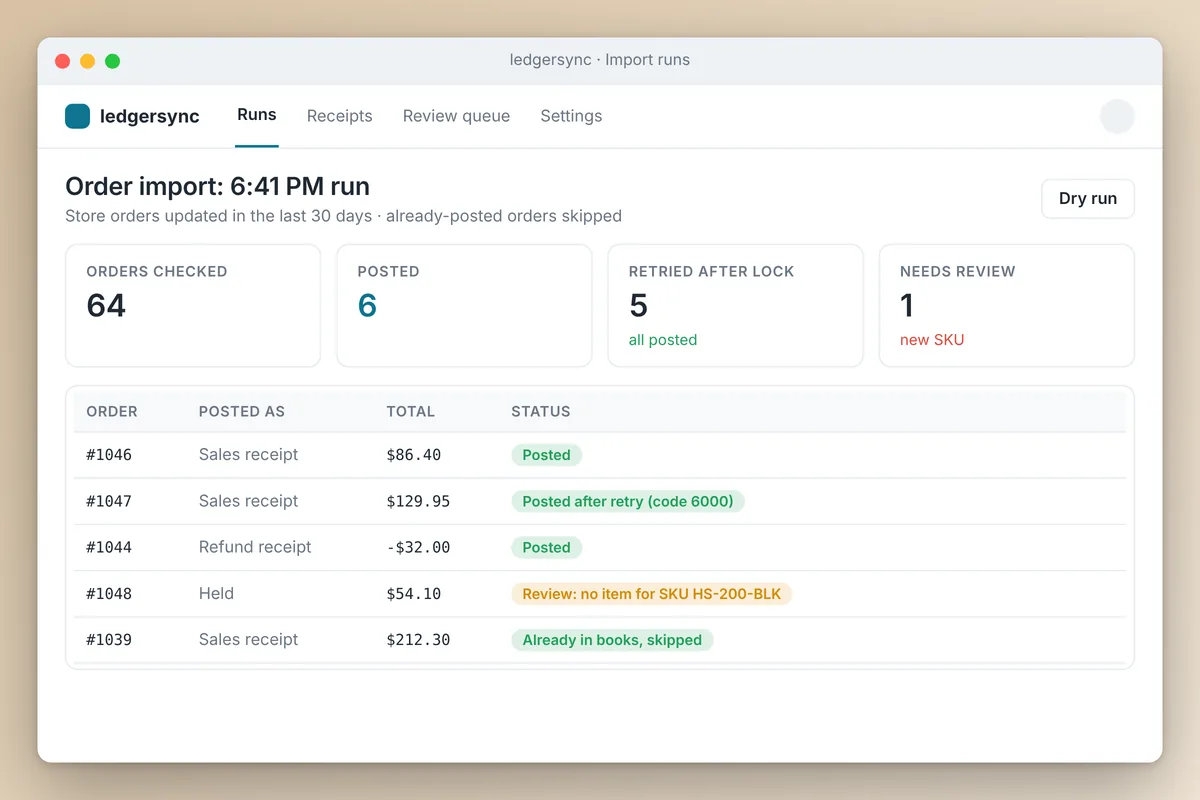
On the second evening, the run reported 1 posted, 5 failed and 1 needing review. Every failure was the same QuickBooks error, code 6000:
Business Validation Error: The action could not be completed because
another user was creating, editing or deleting a transaction with
inventory products at exactly the same time. Please try again in 30 min.
Our read: QuickBooks locks inventory items while a transaction that touches them is being saved, and something else in the same company file was writing inventory transactions while we posted. Nothing was wrong with the receipts themselves.
We got this wrong the first time by treating every failure as final. Here is what we changed:
- Any receipt rejected with code 6000 now waits 60 seconds and gets one retry
- Every other error still fails loudly and emails us
- Posts stay spaced 2 seconds apart
Even without the retry, the next run would pick up those orders on its own, because of the 30-day lookback and the duplicate check. The retry just clears most of them in the same run.
Duplicate protection when a request fails halfway
The scariest failure in any accounting integration is the half-success: QuickBooks saved the receipt, but the response never came back, so you retry and create a duplicate.
QuickBooks Online has a guard for this. Every write can carry a requestid query parameter. Per Intuit's developer blog, if QuickBooks sees the same requestid again for the same company, it returns the original response instead of repeating the operation. We build the requestid from the order number and the run, and the retry gets its own ID, since reusing the original would just return the original error.
Belt and suspenders: the receipt number check at the start of every run catches anything the requestid misses.
How do refunds work?
Each Shopify refund becomes its own refund receipt, dated the day of the refund, not the day of the sale. That keeps a closed month closed.
The Shopify refund ID goes into the receipt memo, which is how the next run knows it is already posted. Refunded items go back at their original price, refunded tax goes back as tax, and any difference between that and the cash actually refunded goes to a refund adjustment line. A refund never posts before its original sale is in QuickBooks.
Should you build your own Shopify QuickBooks integration?
If you only do one thing, get the account setup right before you connect anything: a clearing account, a fee account or item, a discount account, and a clear rule for marketplace tax. That matters more than which tool you pick.
Build your own when you have a format you must match, tax handling the apps do not cover, or several stores feeding one QuickBooks file. Otherwise use an app and review its mappings with your bookkeeper.
We build and run these integrations, with a dry run against a month you have already closed before anything goes live, through our e-commerce management and workflow automation work. If you are weighing tools for the workflow itself, our n8n vs Claude comparison covers where each fits, and once the books are clean, AI dashboards can report from them daily.
Frequently asked questions
Does QuickBooks Online integrate with Shopify natively?
Not out of the box, but Intuit publishes its own Shopify Connector app that imports sales, refunds, fees and payouts, with up to 12 months of history. Third-party apps and custom workflows are the other routes.
Should Shopify orders go into QuickBooks as sales receipts or invoices?
For paid online orders, sales receipts. The customer has already paid, so there is nothing to collect. Invoices make sense for wholesale or B2B orders with payment terms.
How do I reconcile Shopify payouts in QuickBooks?
Post each order to a Shopify clearing or holding account instead of the bank, net of Shopify's fee. When the payout hits the bank, record it as a transfer or deposit from that clearing account. If the clearing account does not drift back toward zero, an order, refund or fee is missing.
What does QuickBooks error 6000 mean when posting Shopify orders?
Code 6000 is a business validation error. The version we hit means another process was saving a transaction with inventory products at the same time. It is a temporary lock, so wait and retry automatically rather than treating it as bad data.
How do I stop duplicate Shopify orders in QuickBooks?
Use the Shopify order number as the QuickBooks receipt number and check for it before every post. If you call the QuickBooks API directly, also send a unique requestid with each write so a retried request returns the original result instead of creating a second receipt.