
The problem
We bill hourly across several client engagements, and every hour has to hold up line by line. A well-known paid automatic tracker still missed a lot. Calls, email, document work and AI sessions were spread across a dozen tools, so we were rebuilding hours by hand at month end anyway.
The goal was simple: capture everything automatically, keep the evidence, and turn it into a clean, reviewable hours sheet in one sitting each month.
What we built
A lightweight Windows background app, written in Python, that logs the active app, window title and browser page every 20 seconds. After 5 minutes without input it flags the time as idle. In the Claude desktop app it also records which conversation is open, so AI work can be tied to a project.
The tracker records raw evidence only. It never classifies or rounds anything. Billing rules live in a separate set of written documents, so changing a rule never means changing the software.
Privacy was a design rule from the start. No keystrokes, no screen contents, no message text, and nothing leaves the PC. It runs on ARM (Snapdragon) and standard Windows laptops without compiling, installs from one setup file, and runs on both partners' machines.
We built and maintain it entirely through Claude, over a couple of weeks of part-time work starting in mid-October.
How the month-end review works
The tracker is only one source. At month end, Claude combines it with the rest of the day's digital trail: browser search history, Google Drive file history, email history, the calendar, video call attendance from Zoom and Wispr Flow, and the Claude chat export. Each source fills gaps the others miss, so time spent researching, editing a document or answering a client thread all lands on the right project. Then it works through a fixed method.
- It classifies each item to a project using a written rule set plus a running map of past decisions. Email and meeting subject lines are matched first, because body text caused false matches.
- It groups activity into working stretches, splitting wherever there is a gap of more than 10 minutes. Time between bursts does not count.
- It builds one timeline across all sources so no minute is counted twice. Precedence runs calendar, files, tracker, AI chats, then email.
- Calls are billed at actual attendance, not the calendar block. Email time is estimated from the words actually written.
- Each stretch is rounded to the nearest quarter hour. Small fragments are pooled per project and billed as one line at month end.
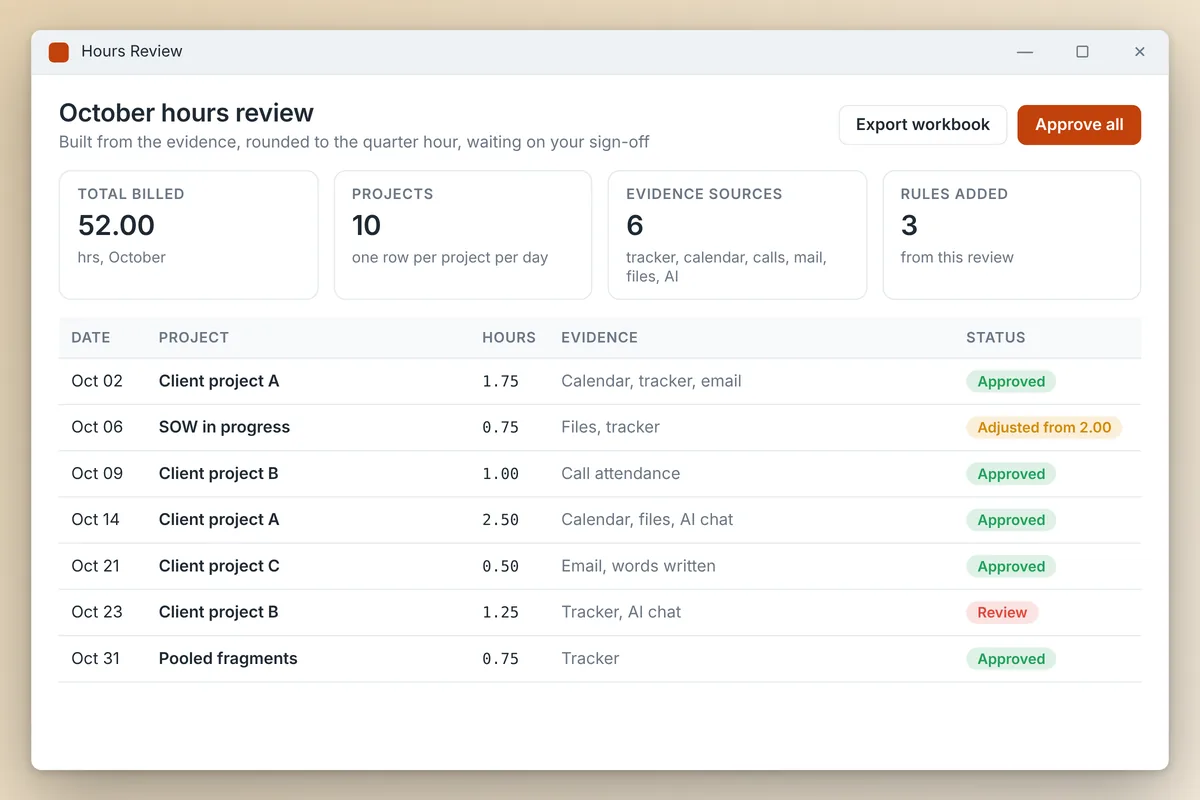
- The output is one row per project per day, with the evidence behind each line, written to a workbook and the team hours sheet.
A person reviews it and adjusts before anything is invoiced.
Results
October, the first full month, took one working session: 52.00 hours across about ten projects, every line backed by evidence.
The review caught real issues, and each one became a permanent rule.
- A proposal showed 2 hours from five short editing bursts spread over an afternoon. The gaps between bursts were being counted. We tightened the clustering rule and the line came down to 0.75 hours.
- Calls were first billed at their calendar length. Actual attendance was shorter, so we switched to attendance-based billing.
- Generic keywords matched news sites and personal browsing, so the rules now require specific terms.
AI does the reconstruction. The person who owns the hours makes the calls, and each correction makes the next month cleaner. It is the same human-in-the-loop pattern we build for clients.
What we would tell another firm
You do not need expensive software to solve an operations problem. A small custom tool that collects evidence, plus AI that applies written rules to it, can beat an off-the-shelf product, because the rules fit how your firm actually bills.
Keep capture and judgment apart. The tracker only records. The rules are documents anyone can read and change.
Use every trail you already have. Search, file, email, calendar and call history already record most of the workday. The value is in pulling them together and applying the rules consistently.
If timesheets eat your month end, this is the kind of AI workflow automation we build. Book a call and we will walk you through it.