
Shopify Collabs is Shopify's free affiliate app for brands. You recruit creators, give each one a link and a discount code, and Shopify tracks the sales and pays commission through your Shopify bill, plus a 2.9% processing fee. The catch: a creator's code can end up on coupon sites, and you pay the discount and the commission on sales you would have made anyway.
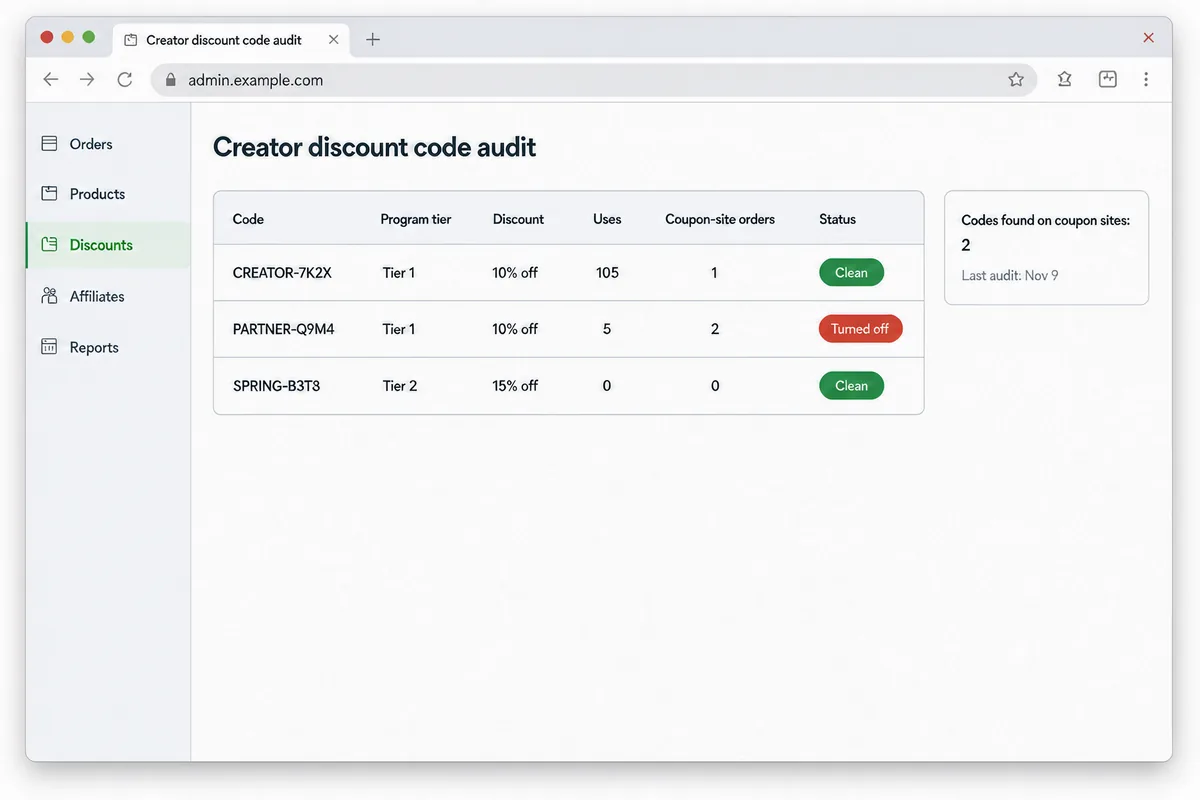
We run Collabs on the Shopify stores of the e-commerce brands we operate. Last week we audited every creator code across three of them. One store was clean, one had no codes at all, and one had two codes live on coupon sites, with roughly 10% of one creator's orders coming through coupon traffic.
Here is how Collabs works from the brand side, what it costs, and the audit we now run every month.
How does Shopify Collabs work for merchants?
Collabs lives inside your Shopify admin. The setup has four parts:
- Programs. You create an affiliate program with a commission rate, an optional customer discount, and optional gifts.
- Creators. You invite creators by email, accept applications through a page on your store, or run an open access offer that lets Collabs creators promote you without approval.
- Links and codes. Each approved creator gets a personal affiliate link and a personal discount code. Shopify credits the sale to the creator when either one is used.
- Payouts. Commissions are held for a period you set, then paid automatically and billed to you.
Shopify's Collabs help center covers the screens. What it does not cover is what happens to those codes once they leave your store.
One current limitation to know before you plan around discovery: Shopify's help center says Collabs is not accepting new creator signups at this time. Existing creators keep access, and you can still invite creators directly and take applications. Our read: treat Collabs as a tool for managing creators you recruit yourself, not as a marketplace that will send you new ones.
What does Shopify Collabs cost?
The app is free to install. The real cost is the commission you set, plus fees on top of it.
| Cost item | What it is | Source |
|---|---|---|
| App fee | None. Free to install | Shopify App Store listing |
| Commission | Whatever rate you set per program | Your program settings |
| Processing fee | 2.9% on every automatic commission payment, billed through your Shopify bill | Shopify: Pay creators on Collabs |
| Holding period | 1 to 90 days before a commission is paid, default 30 | Same page |
| Customer discount | The percentage or amount off you give the creator's audience | Your discount settings |
Shopify lists Collabs as available on all plans except Starter and Retail. Check the help center for your plan before you build a program around it.
Run the math on a single order. On our worst-leaking code, the creator gets 20% commission and the customer gets 10% off. On a $100 order that is $10 of discount, $20 of commission and about $0.58 of processing fee on the commission. Roughly $30 of every $100 goes out the door. That is fine when the creator found the customer. It is a bad trade when a coupon site did.
How do creator codes end up on coupon sites?
Most of the time the creator did nothing wrong. A follower posts the code, a coupon site scrapes it, or a browser extension records it when someone uses it at checkout and then offers it to every shopper on your site.
Coupon sites and coupon extensions then send traffic that was already at your checkout. The shopper was going to buy. The extension pops up, applies your creator's code, and the sale is now credited to the creator.
Two signals told us this was happening:
- Orders with a coupon site as the referring site in Shopify. Those are direct evidence.
- Orders on a creator code with no referrer at all. On their own they prove nothing, but a cluster of them is typical of browser extensions, which apply codes without leaving a referrer.
Our take: don't assume the creator leaked the code. Treat a listing as something to investigate.
How we audited creator codes across three Shopify stores
We ran the audit with Claude connected to Shopify through an MCP connector, so it could read the discounts, codes and orders directly. The steps work just as well by hand, they just take longer.
- Pull every Collabs discount code on each store, with its status, discount value and usage count.
- Search each code on the public coupon sites and in a regular web search for the brand name plus "coupon" or "promo code".
- For every code that turns up publicly, pull its orders and check the referring site and landing page on each one.
- Count orders from coupon sites, orders with no referrer, and orders from the creator's own channels.
- Decide per code: leave it, watch it, or turn it off.
What we found, by store:
| Store | Collabs codes | Found on coupon sites | Result |
|---|---|---|---|
| Brand A | 2 active codes in one tier | Both | One kept and watched, one turned off |
| Brand B | 8 codes | None | Zero uses, nothing public. Clean |
| Brand C | Collabs installed, no creator codes | Not applicable | Nothing to leak |
On Brand A, the first code belonged to a real creator who drives steady traffic. It had about 105 orders since July 2025, roughly $10.7k in sales, at 10% off and 20% commission. Most orders came from the creator's own Facebook, Instagram and link-in-bio traffic. One came from a coupon site and 16 had no referrer.
The second code belonged to a creator nobody on the team recognized. It had 5 uses, and 2 of them, $225 and $25, came straight from a coupon site.
Should you turn off a leaked creator code?
Turn off the code when the leak is most of what it does. Keep it when the creator is real and the leak is a small share.
That is the call we made. The unknown creator's code went off the same week. The real creator's code stayed on. He uses the same code across every channel he runs, so a new code just for us would break his links everywhere and cost us more than the leak does.
Our first instinct was to leave both alone, since there is always going to be some leakage. That was the wrong call for the second code. A code with five uses and two coupon-site orders is not a creator program. It is a coupon.
One mechanical detail bit us. In our store, both codes sat under the same Collabs tier discount in Shopify. Turning off the discount would have killed the good creator's code too. We removed just the one code and left the tier running.
If you only do one thing: check which codes share a discount before you turn anything off.
How do you keep creator codes from leaking in the first place?
You cannot stop it completely. You can make leaks cheaper and easier to catch:
- One code per creator, never shared. If a code leaks, you know whose it is.
- Hard-to-guess codes. A random suffix stops shoppers guessing the creator's name plus 10.
- Invite-only programs over open access when leakage worries you.
- Lower discounts on evergreen codes, higher discounts on time-boxed campaign codes with an end date.
- Shopify's discount limits where they fit: a minimum purchase, an end date, one use per customer, and rules on which other discounts it can combine with.
- A line in your creator agreement that bans posting codes to coupon sites and lets you remove a code that ends up there.
- Links over codes when the customer discount is not the point. A link with no public code leaves nothing to scrape.
Then audit monthly. With AI doing the pulling and sorting, it is a short job. Shopify's own Flow automations can also help if you are on a plan that includes them; the help center notes that Collabs works with Shopify Flow.
Who should own this?
Whoever owns your promotions calendar. On our team, the partner who runs marketing for the brand now turns codes on and off himself through the same Shopify connector, without waiting on anyone. That is the setup we would recommend: one person, one monthly check, and the authority to kill a code the same day.
This kind of operating hygiene is a big part of our e-commerce management work. If you are sorting out the cost side of marketing more broadly, our guide to Amazon TACoS covers the same question for ad spend, and our Shopify QuickBooks integration guide covers how discounts and fees land in the books.
Frequently asked questions
Is Shopify Collabs free for brands?
The app is free to install. You pay the commission you set for each creator, plus a 2.9% processing fee on every automatic commission payment, billed through your Shopify bill. Customer discounts are a cost too, so price a creator program on discount plus commission plus fee, not commission alone.
Can I turn off one creator's discount code without affecting the others?
Yes, but check first. In our store, several creators' codes sat under one Collabs tier discount, so turning off the whole discount would have disabled all of them. Remove or deactivate the single code instead, then confirm the other creators' codes still work at checkout.
How do I know if my creator codes are on coupon sites?
Search each code and your brand name plus "coupon" or "promo code" on the web and the large coupon sites. Then check the referring site on that code's orders in Shopify. Orders from a coupon site are direct evidence. A cluster of orders with no referrer is a strong hint of browser coupon extensions.
Is Shopify Collabs still accepting new creators?
Shopify's help center currently says Collabs is not accepting new creator signups. Existing creators keep access, and brands can still invite creators directly and accept applications through their store page. Check the help center before planning a program that depends on creators finding you.
Should I pay commission on orders that came from coupon sites?
That depends on your creator agreement, so write it down before it comes up. Our approach is to judge the code, not the single order: a real creator with a small leak keeps earning, and a code that is mostly coupon traffic gets turned off.