
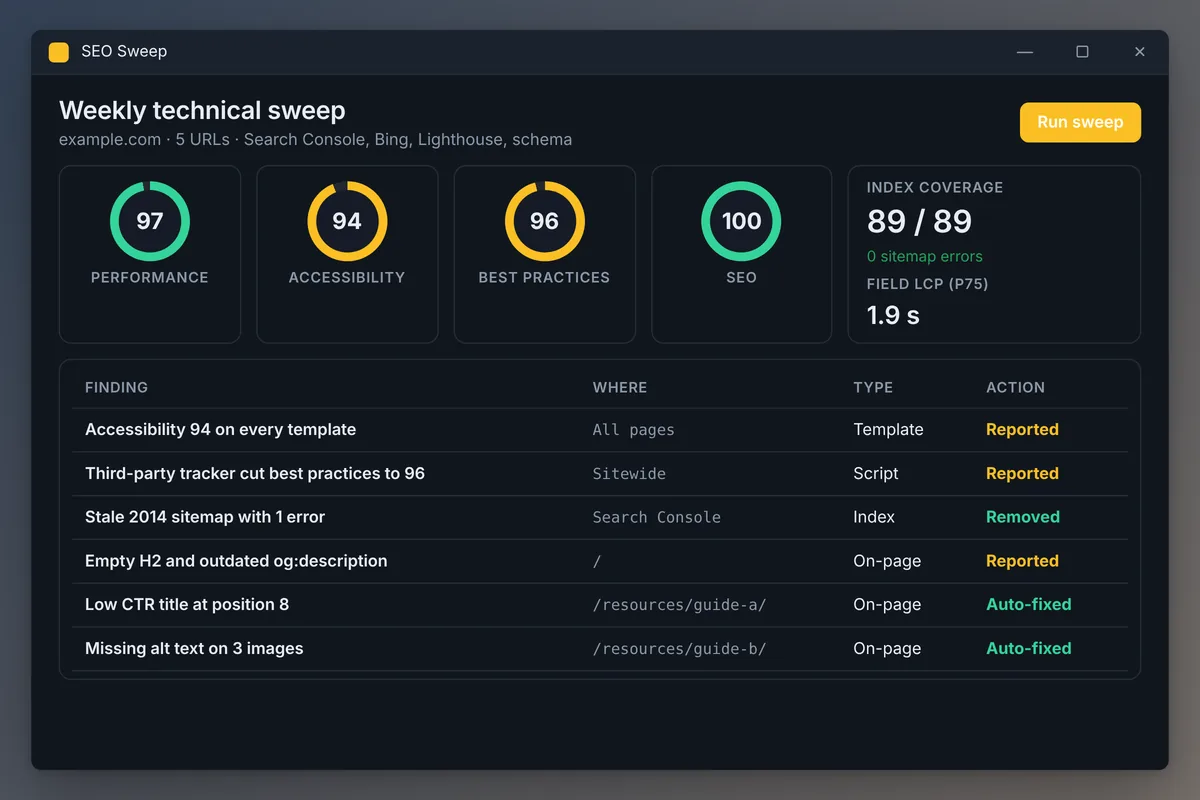
Technical SEO services are the work of making sure search engines and AI tools can find, crawl, render and understand your pages. In practice that means checking indexing and sitemaps, redirects and canonicals, page speed and Core Web Vitals, structured data, and the template-level problems that quietly hold every page back. Good technical SEO is boring, repeatable and mostly about fixing a short list in the right order.
We run this sweep on shiptronix.com every week, alongside the content work. So rather than describe technical SEO in the abstract, this is what the work looks like when you actually do it, what it has turned up on our own site, and what we would ask any agency before paying for it.
Where technical SEO stops and content SEO starts
The easiest way to think about it: technical SEO decides whether a page can compete, and content decides whether it wins. A great article that Google can't index earns nothing. A perfectly fast, perfectly marked-up page with nothing useful on it also earns nothing.
When we relaunched our own site in October, the technical scores were already strong (97 for performance and 100 for SEO in Lighthouse) and we still had zero Google rankings. That told us the technical side was not the bottleneck. Content was. Impressions went from about 3 a day to about 170 a day within a few weeks of publishing real guides, with no change to the technical foundation.
That is worth saying out loud because a lot of technical SEO gets sold as the fix for a traffic problem it did not cause.
What a technical SEO sweep actually covers
Our weekly sweep has four parts, and most real audits look about the same once you strip the padding.
Indexing and crawl health comes first. We pull the Sitemaps and indexing reports from Google Search Console and the crawl report from Bing Webmaster Tools, and look for errors, pages excluded from the index, and anything Google says it found but chose not to index. We also confirm that the www and http versions of the domain 301 to the one canonical address. Sitemap mistakes are common and easy to miss: Google caps a single sitemap at 50,000 URLs or 50 MB uncompressed, and plenty of sites still have old sitemaps registered from a previous platform.
Next is page experience. We run Lighthouse on the homepage, one service page and the two newest articles, and record the four scores (performance, accessibility, best practices, SEO) plus the main failing audits. Lighthouse is lab data. Google ranks on field data from real Chrome users, so we treat Lighthouse as the early warning and the Core Web Vitals report in Search Console as the scoreboard.
Then on-page checks: titles, meta descriptions, canonicals, heading structure, alt text, broken links and Open Graph tags, page by page. This is where duplicate titles and empty headings show up.
Last is structured data. We check that the schema on each page is valid and that it matches what the page is. Articles carry Article schema, FAQ sections become FAQPage schema, and product pages on the stores we run carry Product schema with price and availability. We spent a weekend checking schema on 1,150 ecommerce product pages for our product schema study, and missing or broken schema was far more common than we expected.
The Core Web Vitals numbers that matter
Google's Core Web Vitals are three metrics, each judged at the 75th percentile of real visits. The thresholds come from Google's own documentation:
| Metric | What it measures | Good | Poor |
|---|---|---|---|
| Largest Contentful Paint (LCP) | How fast the main content loads | 2.5 seconds or less | Over 4 seconds |
| Interaction to Next Paint (INP) | How fast the page responds to a tap or click | 200 ms or less | Over 500 ms |
| Cumulative Layout Shift (CLS) | How much the layout jumps while loading | 0.1 or less | Over 0.25 |
INP replaced First Input Delay in March 2024, so any audit that still reports FID is working from an old template. That is a quick tell. When we pulled real-user data for 1,150 ecommerce brands, INP was the metric that failed most often; the full numbers are in our Core Web Vitals study.
On most small and mid-size business sites, the fixes behind these numbers are not exotic. Oversized hero images, a pile of marketing scripts loading before the content, fonts that swap late, and ad or chat widgets that push the page around. The hard part is usually organizational: the scripts belong to marketing, the theme belongs to an agency, and nobody owns the total.
What our own sweeps have found
We have been honest with ourselves in our internal log, so here is what the last few weeks turned up on a site that already scores well.
Accessibility sat at 94 on every page we tested, week after week. Same number on the homepage, service pages and articles means a template problem, most likely color contrast, not something wrong with any one page. That is the kind of finding that should be reported once and fixed in the template, not "fixed" page by page.
Best practices dropped from 100 to 96 across the site in one week. The only new thing on the pages was a third-party sales tracking script. When the script came off the inner pages, the score went back to 100. One tag, sitewide hit, and most marketing stacks carry several.
A sitemap from 2014 was still registered in Search Console, from the old version of the site, with an error against it. It was not hurting much, but it was noise in the report and it took two minutes to remove.
The homepage had an empty H2 heading and an Open Graph description that still described an older positioning, so links shared on social showed the wrong summary. Small, but it is the first thing a prospect sees when someone sends them the link.
And one limit on the tooling itself: the Lighthouse runs from our SEO data provider only test the desktop version, so mobile scores have to come from Search Console field data or a separate PageSpeed Insights run. If an agency hands you desktop-only scores, ask where mobile is.
None of these were dramatic. That is normal. On a site that was built with care, technical SEO is mostly catching drift: a new script, a leftover setting, a template change that touched more pages than anyone meant.
What to fix yourself and what to hand off
We split every finding into two buckets, and we would suggest any business do the same.
Safe fixes go out the same day: rewriting a title or meta description that gets impressions but no clicks, adding internal links between related articles, adding missing alt text, fixing a broken link in article content, correcting front matter or schema on a single page. These change content, not the site, and they are easy to roll back.
Everything else gets reported and scheduled: templates, CSS, build code, redirects, navigation, the homepage, DNS and anything on the hosting side. These touch every page at once, so they need a preview, a backup and someone who knows what else depends on them. We keep a rollback tag before any template change on our own site, because we have been burned by "small" CSS edits that shifted a layout we had not looked at.
If you are moving platforms, the technical SEO work grows fast, because redirects, canonicals and sitemaps all change at once. Our website migration checklist covers that case, and we handle it for clients as part of website hosting and migration.
How technical SEO affects AI search
The same foundation decides whether ChatGPT, Claude, Perplexity and Google's AI Overviews can use your pages. Most AI tools that search the web pull from a search index first, so a page that is not indexed or not crawlable is invisible to them too. Clean structure helps them quote you: a direct answer near the top of the page, headings that match real questions, and valid schema.
We cover the content side of that in our guide to AEO services. The short version is that technical SEO is the entry ticket for AI answers, not a separate project.
How to judge a technical SEO agency
If you only do one thing: ask for the top ten findings in priority order, each with the page it affects, why it matters and who has to fix it. A real audit fits on a page or two. A 200-page PDF of every warning a crawler can generate is a sign that nobody did the prioritizing, which is the part you are paying for.
Beyond that, ask whether they report on field data or only lab scores, whether they test mobile, whether they will make the safe fixes themselves or only recommend them, and how they plan to check that fixes held a month later. Pricing varies widely, from one-off audits to monthly retainers, so compare scope line by line rather than price alone.
Frequently asked questions
What is included in technical SEO services?
Usually indexing and crawl checks in Google Search Console and Bing, sitemap and redirect review, page speed and Core Web Vitals, structured data validation, and on-page checks such as titles, canonicals, headings and alt text. A good provider also prioritizes the findings and either fixes the safe ones or hands a clear list to whoever owns the site.
How often should a technical SEO audit be done?
A full audit once or twice a year is enough for most business sites, with a lighter check every week or month. We run a short sweep weekly on our own site because new scripts and template changes cause most problems, and they show up between audits.
Do Core Web Vitals really affect rankings?
They are part of Google's page experience signals, but they work more like a tiebreaker than a main factor. A slow site with the best answer can still outrank a fast site with a weak one. Fixing them is still worth it because slow, jumpy pages also lose visitors and sales.
Can I do technical SEO myself?
Much of it, yes. Search Console, Bing Webmaster Tools and PageSpeed Insights are free, and fixing titles, descriptions, alt text and internal links needs no developer. Template, redirect and hosting changes are where outside help pays for itself, because a mistake there affects every page at once.
Does technical SEO help with ChatGPT and AI search?
Yes, indirectly. AI tools that search the web mostly rely on a search index, so pages that are not indexed or crawlable cannot be cited. Clean headings, a direct answer near the top and valid schema make a page easier to quote.